Case Study: Automated Email Sending from Google Sheets Using n8n
The Problem: Manual Email Sending Doesn’t Scale
Many teams still rely on spreadsheets to manage customer communication — but when it comes to actually sending emails, things fall apart.
Common issues include:
- Manually sending emails one by one
- Forgetting scheduled send dates
- Sending emails to the wrong status or contact
- No clear visibility into what’s already been sent
As the list grows, consistency drops and follow-ups get messy.
The challenge was clear:
How do we send the right emails, to the right people, at the right time — automatically?
The Solution: Spreadsheet-Driven Email Automation
In this case study, we break down an n8n workflow that turns Google Sheets into a lightweight email automation system.
Instead of using complex email tools, this setup uses a simple idea:
- Google Sheets acts as the control center
- n8n handles logic, timing, and delivery
- Gmail sends personalized emails automatically
Once the system is live, adding a new row to the sheet is all it takes.
How the Automation Works (High-Level)
The workflow follows a clean and controlled flow:
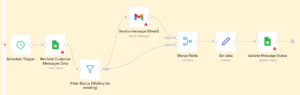
- Google Sheets is monitored for new or updated rows
- Only rows marked as “waiting for sending” are processed
- Emails are filtered by the current date
- Personalized emails are sent via Gmail
- The spreadsheet is updated with the sending status
This ensures emails are sent once, on time, and with full visibility.
Why This Matters
With this automation in place:
- Manual email sending is eliminated
- Teams avoid duplicate or missed emails
- Communication stays consistent
- Google Sheets becomes a live campaign tracker
It’s especially useful for:
- Outreach campaigns
- Customer follow-ups
- Scheduled announcements
- Internal or operational emails
How We Think About Systems Like This
This case shows how we approach automation problems:
- Use tools teams already work with
- Add logic where humans usually make mistakes
- Keep workflows simple, visible, and controlled
- Let systems handle repetition
If a spreadsheet can safely trigger emails like this, the same thinking can be applied to more complex customer journeys and operations.