Case Study: Syncing WooCommerce Customers to Mautic Automatically
The Problem: New Customers Falling Through the Cracks
When someone makes a purchase or creates an account in WooCommerce, that data is valuable — but only if it reaches the marketing system.
Many stores still deal with:
- Customers not being added to email campaigns
- Manual CSV exports between platforms
- Delayed follow-ups after sign-ups or purchases
- Disconnected sales and marketing tools
The challenge was simple:
How do we make sure every new WooCommerce customer is instantly available for marketing and follow-ups?
The Solution: Real-Time WooCommerce to Mautic Automation
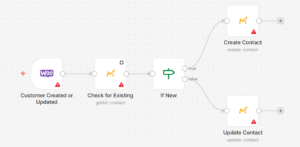
In this case study, we look at an n8n workflow that automatically connects WooCommerce with Mautic.
The moment a new customer is added in WooCommerce:
- The workflow is triggered automatically
- Customer data is captured in real time
- The contact is created or updated in Mautic
No exports. No delays. No manual work.
How the Automation Works (High-Level)
The workflow follows a straightforward flow:
- WooCommerce detects a new customer
- n8n triggers the automation instantly
- Customer details are sent to Mautic
- The contact becomes available for campaigns and segmentation
This ensures marketing systems stay up to date without human involvement.
Why This Matters
With this automation in place:
- Every customer is captured instantly
- Email marketing starts at the right time
- Customer data stays consistent across tools
- Teams save time and avoid manual errors
This setup is ideal for:
- E-commerce stores
- Marketing teams using Mautic
- Businesses focused on lifecycle email marketing
How We Approach Integrations Like This
This case highlights how we think about integrations:
- Connect systems where data is created
- Trigger actions in real time
- Remove manual syncing entirely
- Keep marketing tools always updated
If your store or platform generates customer data, we focus on making sure that data flows automatically to the tools that actually use it.